

You can now log calls in HubSpot automatically with WaveKat Voice. Connect your HubSpot account once, and every phone call you take or place after that files itself in your CRM — on the right contact, with the time, direction, outcome, duration, the transcript, and a recording you can play without leaving HubSpot. No API keys, no middleware, no browser extension, and nothing to remember after you hang up. It’s live today on your WaveKat account as a Pro feature — and during early access, Pro is free.
This is another piece of giving every small business the voice of a big one. A big company’s CRM knows about every call because someone is paid to make sure it does. Yours can know about every call because the phone app you already use — the one that records and transcribes each conversation — quietly writes it down where your customer records live.
What lands in HubSpot after every call
When a call ends, WaveKat looks the other person up in your HubSpot contacts by phone number and files a call record on their timeline:
| In HubSpot | What it says |
|---|---|
| Contact | Matched by phone number; optionally created when nobody matches |
| Time & direction | When the call happened, inbound or outbound |
| Outcome & duration | Answered, missed, or failed — and how long it lasted |
| Title | A one-line summary, e.g. “Inbound call · answered · After hours” |
| Transcript | The full conversation, unless you switch transcript sync off |
| Recording | Playable in HubSpot’s own player when the call was recorded |
| Link | Back to the call in WaveKat, with the waveform and every flow step |
The record looks like a call a diligent colleague logged by hand — except it’s every call, it’s verbatim, and it happened while you were making coffee. If a caller rings twice, or a sync retries, the same call is never filed twice: WaveKat remembers which HubSpot record belongs to which call and updates it instead of creating a twin.
Play the recording inside HubSpot
The recording doesn’t get copied into HubSpot — something better happens. The call record carries what HubSpot needs to ask WaveKat for the audio at the moment someone presses play, and WaveKat answers with the recording right then. In practice that means:
- Playback lives on the contact timeline. A colleague reviewing the deal presses play in HubSpot and hears the call — no switching apps, no forwarded files.
- Deleting a call really deletes it. When a recording is removed in WaveKat, there is no copy left behind in HubSpot to outlive it. The next press of play finds nothing, because there is nothing.
- Access stays yours. Every play is a request WaveKat serves and can refuse — for a disconnected integration or a deleted call. A copied audio file could never take an answer back.
For the transcript and the flow’s step-by-step story, the record links back to the call page in WaveKat, where the two-lane player and speaker-labeled transcript live.
Connect once — no API keys, no setup
Connecting is one click on your WaveKat account page: you land on HubSpot’s own consent screen, approve, and you’re back — connected. There is no developer account to create, no private app to configure, no scopes to pick, and no token to paste. Before you click, the page states plainly what will be sent, and the privacy policy spells out the same list in plain words.
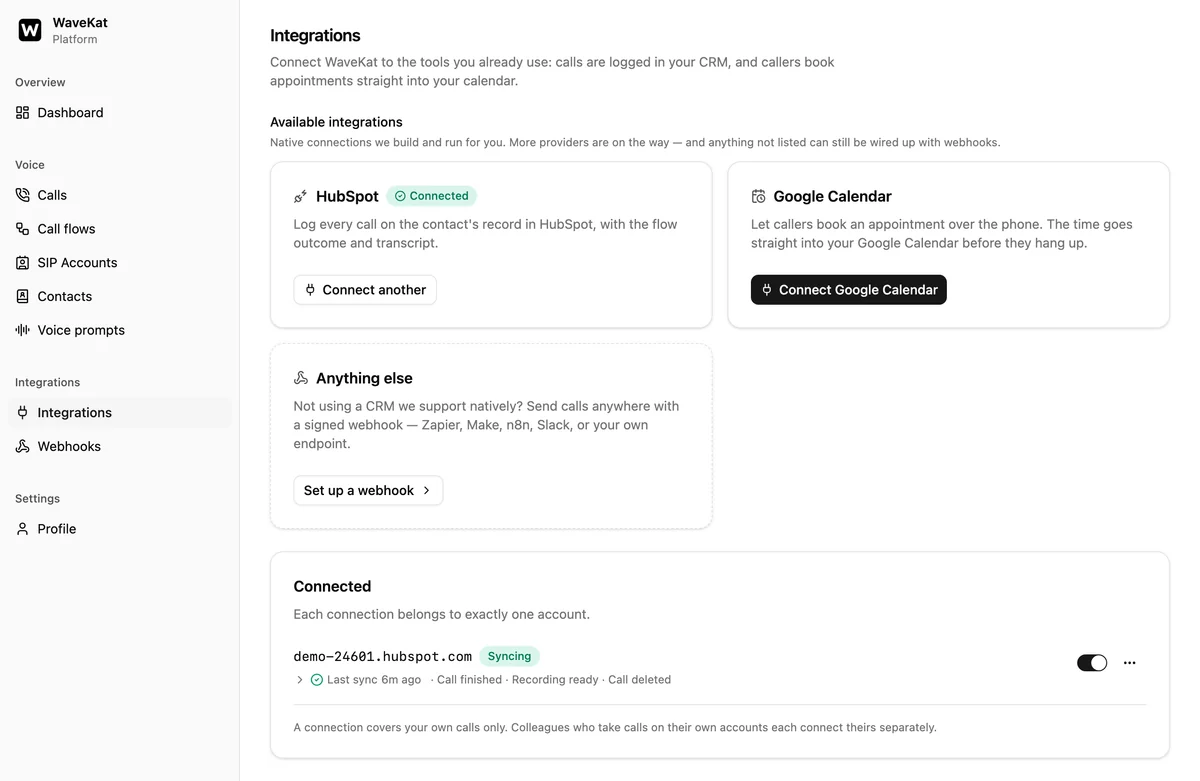
Disconnecting is just as clean: WaveKat asks HubSpot to revoke its access and wipes the stored credentials. Call records already written into your HubSpot stay where they are — that’s your CRM’s history, and disconnecting an integration is not the same as deleting your past.
You decide what syncs
Four switches, each set per connection:
| Switch | Default | What it does |
|---|---|---|
| Include the transcript | On | Puts what was said into the call record |
| Create missing contacts | On | Adds a HubSpot contact when a caller’s number matches none |
| Carry deletions through | On | Removes the call from HubSpot when you delete it in WaveKat |
| Name unknown callers by their number | Off | Uses the caller’s number as the contact name when the carrier sends none |
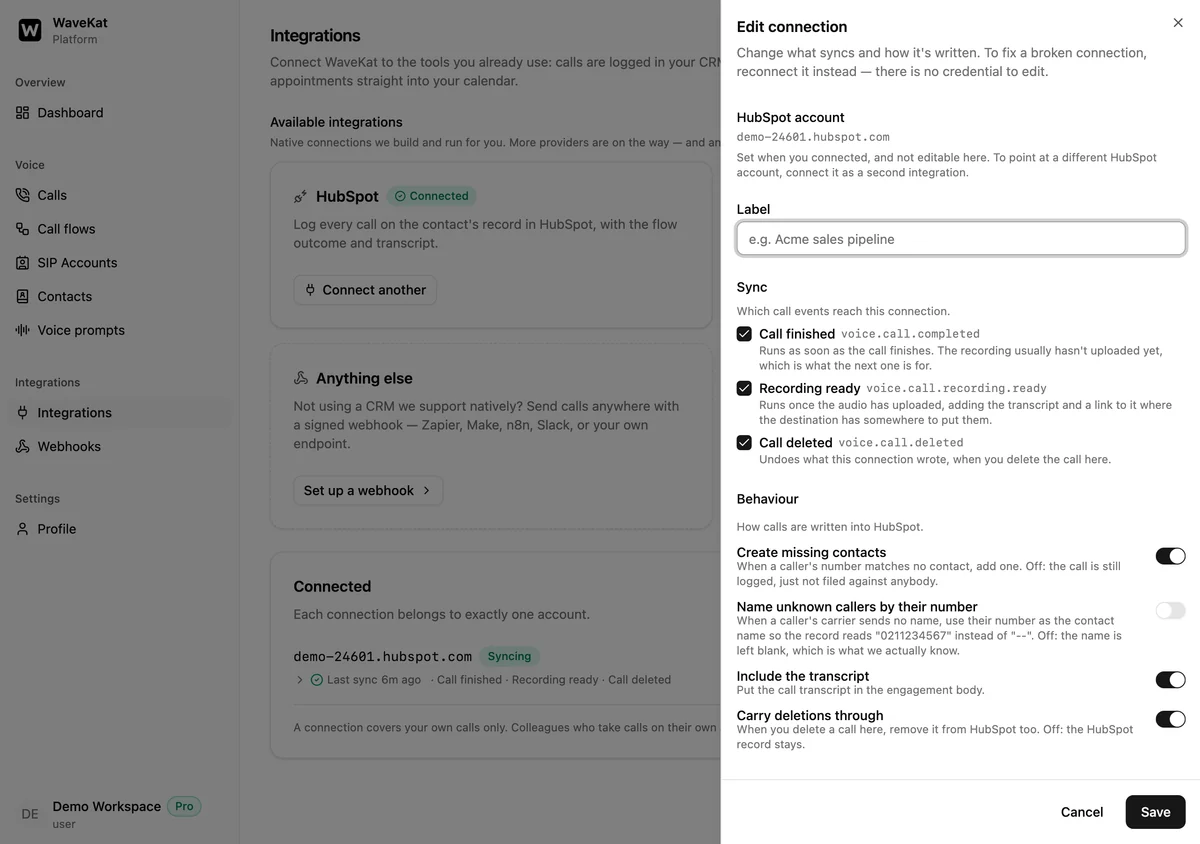
That last one is off on purpose: a blank name is accurate, and the first colleague to recognise the number fills it in permanently. When you do switch it on, the number goes in the last-name field — never the first name, because HubSpot feeds first names into email personalisation, and “Hi 021 123 4567” is not a message anyone means to send.
One honest note, the same one the privacy policy makes: the person you spoke to never agreed to anything with us. Logging their number, their voice, and their words in your CRM is the same responsibility as recording the call in the first place — the switches exist so you can match what you sync to what you’re comfortable holding.
Every call shows where it went
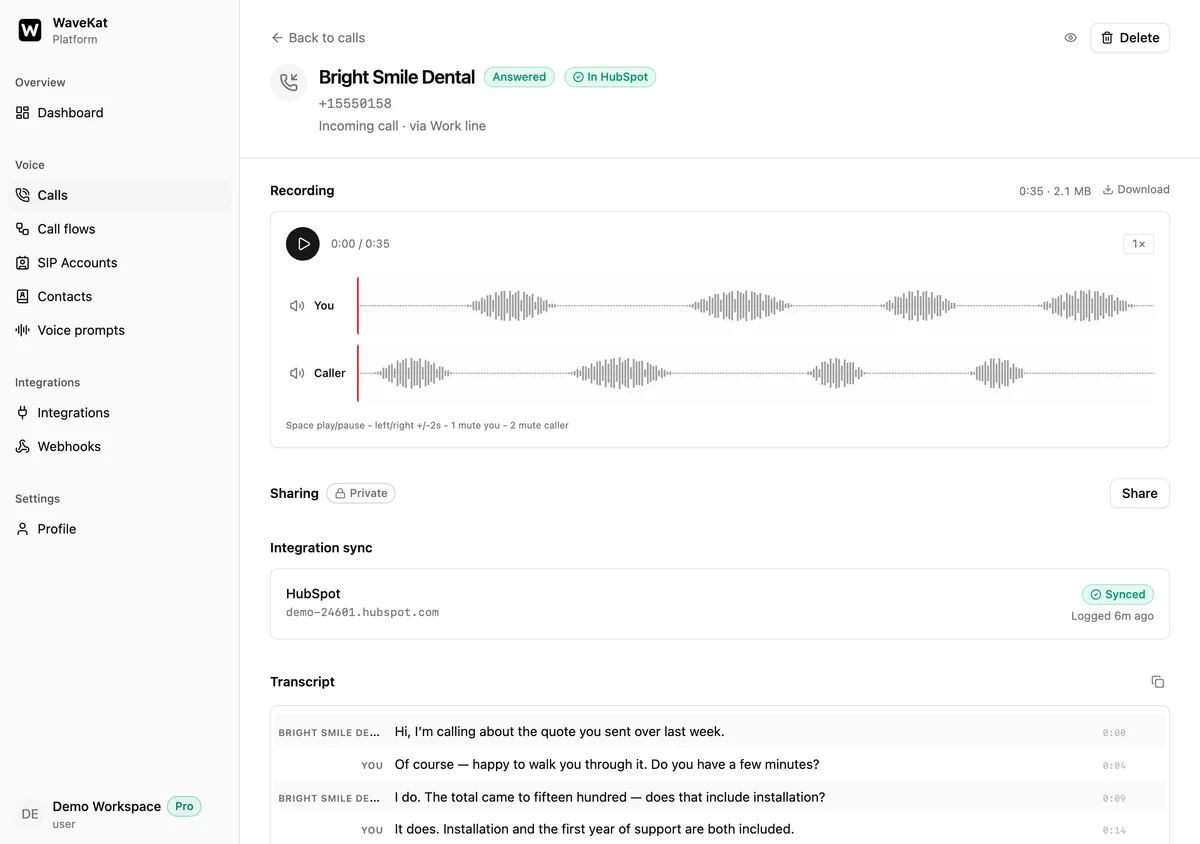
Open any call in WaveKat and it tells you whether it reached your CRM: an In HubSpot badge when it’s filed, a pending state while it’s on its way, and — if something went wrong — the reason, in HubSpot’s own words. A sync that fails keeps retrying for a day with backoff, and a connection that loses access says “reconnect” rather than failing silently. No guessing whether the pipeline is working.
Ways to log calls in HubSpot
There are several routes to getting phone calls into HubSpot, and they suit different setups:
| Route | What it takes | Keeps your phone provider? |
|---|---|---|
| Log calls manually | A rep typing after every call | Yes |
| HubSpot’s built-in calling | Calling through HubSpot with a HubSpot-provided number | No |
| Cloud dialer platforms | Moving your calling to that platform, per-seat pricing | No |
| Webhooks + an automation tool | A third-party automation plan and a pipeline to maintain | Yes |
| WaveKat Voice native integration | One click to connect; calls stay on your own SIP line | Yes |
The dialer platforms are genuinely good at what they do — power dialing, SMS, call coaching for sales teams. What they ask is that your calling move to them. WaveKat Voice takes the opposite bet: you keep the phone provider you already have, your calls happen on your own computer, and HubSpot is a destination your calls report to — not the system they live in.
Free and Pro
The native HubSpot integration is a Pro feature — the same tier that routes calls with menus and transfers. During early access, upgrading to Pro is free: one click on your WaveKat account page, no payment step, and it gives you a year.
Free accounts still have a CRM path: webhooks, which post a record of each call to any URL you give them — free during the beta. The native integration is what you upgrade to when you want the stateful parts: contact matching, deduped records, recording playback, and deletes that propagate.
Frequently asked questions
How do I log calls in HubSpot automatically with WaveKat Voice?
Sign in to your WaveKat account with cloud sync on, then click “Connect HubSpot” on the Integrations page and approve on HubSpot’s consent screen. From then on, every call you take or place in WaveKat Voice is filed in HubSpot automatically — there’s nothing to do per call.
Does WaveKat Voice create HubSpot contacts automatically?
Yes, when you leave “create contacts” on. WaveKat matches each call to a HubSpot contact by phone number; when nobody matches, it creates the contact so the call still files against a person. Switch it off and unmatched calls are logged without a contact.
Can I play call recordings inside HubSpot?
Yes. A recorded call’s HubSpot record plays in HubSpot’s own player on the contact timeline. The audio is fetched from WaveKat at play time rather than copied, so deleting a call in WaveKat really removes it — there’s no stray copy left in the CRM.
What happens in HubSpot when I delete a call in WaveKat?
With “propagate deletes” on (the default), the HubSpot call record is archived when you delete the call in WaveKat, and its recording stops playing. Switch it off and your HubSpot history keeps the record even after the call is gone from WaveKat.
Do I need an API key to connect HubSpot?
No. The connection is one click through HubSpot’s own consent screen — no private app to configure, no API key to create or paste. If you’d rather build your own pipeline, webhooks are still there and post each call to any URL you choose.
Is the HubSpot integration free?
It’s a Pro feature. During early access, Pro is free — one click on your WaveKat account page gives you a year, with no payment step. Webhooks remain available on free accounts as the do-it-yourself route to a CRM.
Which platforms does this work on?
WaveKat Voice runs on Mac and Linux today. The HubSpot integration lives in your WaveKat account, so it works the same from either — and the calls it logs are readable in HubSpot from any browser.
Try it
Download WaveKat Voice, sign in with cloud sync on, and click Connect HubSpot on your Integrations page. Your next call will be in your CRM before you’ve finished your notes — which, come to think of it, you no longer need to take.
Recording, transcription, sharing, and now the CRM — the call keeps becoming more useful after you hang up.